R Environment for Environmental Sciences
Four packages for more reproducible ecological research
Companion page to the iDiv 2026 conference poster. renv, pins, testthat and rmarkdown: what each one solves, how they fit together, and the details that did not fit on A0.
You have just scanned the QR code on my poster. Welcome: this page is the long version.
The poster makes a single argument: reproducibility in ecological research is not one tool, it is a short sequence of them. Four packages cover most of the distance between raw data and a reliable publishable result, and many researchers are already using just one of them. This page is the nudge to pick up the other three.
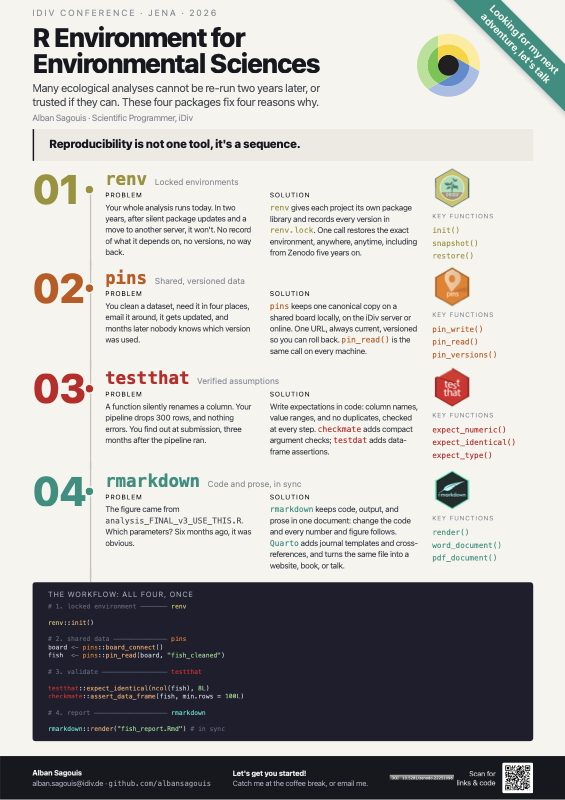
The poster
A0 portrait, presented at the iDiv Conference 2026 in Jena. Everything below is the long version of what is on it.
- Download the PDF: A4, so it prints on an ordinary printer. The print-ready A0 is on Zenodo.
- Source on GitHub: the self-contained
poster.html, and the R script that generates the QR code you scanned to get here  : archived on Zenodo with the A0 PDF and a snapshot of the repository. That is the DOI printed on the poster and it names this version; 10.5281/zenodo.22251095 always resolves to the latest one.
- The four packages: renv · pins · testthat · rmarkdown
- All four together: the workflow from the bottom of the poster, annotated
- Where to go next: documentation and further reading
I am a scientific programmer at iDiv, and I am currently looking for my next role. If any of this is the kind of work your team needs, my CV is here and I would be glad to talk: alban.sagouis@idiv.de.
The problem, stated once
Every one of the four packages below exists because of the same underlying failure: something true at the moment you ran the code was never written down.
Which package versions were loaded. Which copy of the dataset. What shape the data was supposed to be. Which script produced the figure. All of it was obvious on the day, and none of it survived contact with six months, a new laptop, or a co-author.
The fix is not discipline. It is putting each of those facts somewhere the computer can check it.
renv: locked environments
What breaks without it
Your paper runs today. In two years, after a dozen silent package updates and a move to a new machine, it does not. There is no record of what it depended on, no version numbers, and no way back. The error you get will be some deep downstream complaint about an argument that no longer exists, and tracing it to the package that changed is a bad afternoon.
This is the failure mode that quietly invalidates archived code. A repository on Zenodo is only reproducible if the environment it assumed can be rebuilt.
What renv does
renv gives each project its own package library and records every version in a plain-text renv.lock. One call restores the exact environment, on any machine, at any point in the future.
renv::init()      # private library for this project + a first lockfile
renv::snapshot()  # record what is currently loaded, after adding a package
renv::restore()   # rebuild the recorded environment from renv.lock
renv::status()    # what differs between the lockfile and the library
init() also writes an .Rprofile that activates the project library on every start. That is why the workflow is nearly invisible once set up: open the project, and you are already in the right environment.
The details that did not fit on the poster
Commit the lockfile, never the library. renv.lock belongs in git. The renv/library/ directory does not: it is large, platform-specific, and fully reconstructible from the lockfile. init() writes a .gitignore that handles this for you; do not undo it.
Record the source, not just the version. renv.lock stores where each package came from, be it CRAN, Bioconductor, GitHub or a local tarball, so a package installed with remotes::install_github() restores from the same commit. This is what makes lockfiles work for the half-finished dependency every ecology project seems to have.
snapshot() is not automatic. It records the current state when you ask it to. Install a package and forget to snapshot, and your lockfile is a lie that will not surface until someone else runs restore(). renv::status() before a commit catches this in one line.
Cross-platform restore has limits. The lockfile records versions, not compiled binaries. Restoring a Linux-built project on macOS recompiles from source, which needs a toolchain and takes time. It works; it is not instant.
Before archiving a project, clone it into a fresh directory and run renv::restore() as if you were a stranger. Whatever breaks there would have broken for your reader, except they would have emailed you about it, or more likely, not bothered.
I have written about renv at more length in Tech news 12: Simple reproductibility in R, including renv::checkout(date = ...), which recovers a project that has already stopped working.
pins: shared, versioned data
What breaks without it
You spend three weeks cleaning a 2 GB dataset. Then you need it in four places: your laptop, the iDiv server, the HPC cluster, a colleague. So you email it. Then it gets updated. Six months later there are four versions in circulation, each subtly different, and nobody can say which one produced which figure.
This is a quieter failure than a broken environment, and a worse one: it does not throw an error. It just makes two analyses disagree.
What pins does
pins keeps one canonical copy on a shared board and hands out a stable reference to it. Reading is the same call on every machine.
library(pins)

board <- board_folder(path = "~/shared/boards/biodiversity")

board |> pin_write(
  x    = fish_cleaned,
  name = "fish_cleaned",
  type = "parquet",
  description = "Cleaned fish occurrences, gbif snapshot 2026-02-01"
)

fish <- board |> pin_read(name = "fish_cleaned")
Swap board_folder() for board_url(), board_connect() or board_s3() and every other line stays identical. That is the point: the board is configuration, not code.
The details that did not fit on the poster
Versioning is the feature. Every pin_write() can keep the previous version rather than overwriting it, so you can see what changed and roll back.
board |> pin_versions(name = "fish_cleaned")
board |> pin_read(name = "fish_cleaned", version = "20260201T104512Z-a3f9c")
Pinning a version explicitly in an analysis script is the strongest form of this: the script then names the exact bytes it was written against.
Metadata travels with the data. pin_meta() returns the description, the creation time, the file type and anything custom you attached. A dataset that carries its own provenance is one fewer thing living in a README nobody reads.
Public sharing is read-only and free. board_url() points at plain HTTP, so a pin published anywhere static, including GitHub Pages, is readable by anyone with the URL and no credentials.
pinsis built for objects that fit comfortably in memory and change occasionally- cleaned tables, model outputs, lookup keys, fitted objects. It is not a replacement for a spatial data store or a database. If you are moving multi-gigabyte rasters or querying a slice of something enormous, reach for the tool built for that and pin the derived table instead.
testthat: verified assumptions
This is the least obvious of the four for an ecologist, and the one I would argue pays back fastest.
What breaks without it
A cleaning step silently drops 300 rows. A join fans out and doubles your counts. A column-name mismatch fills a variable with NA. None of these throw an error. You find them at submission, three months after the pipeline ran, and then you get to work out which figures were affected.
What testthat does
It lets you write down, in code, what you expect the data to look like, and check it automatically, every time.
library(testthat)

expect_identical(object = ncol(fish), expected = 8L)
expect_true(object = !anyDuplicated(fish$record_id))
expect_true(object = all(fish$year >= 1900L & fish$year <= 2026L))
The assumption stops living in your head and starts living where the computer can enforce it.
You do not need a package to use it
This is the misconception that keeps ecologists away from testthat: it looks like tooling for package developers. It is not. The expect_* functions work in a plain script: they simply throw an informative error when the expectation fails, which is exactly what you want in the middle of a pipeline.
For a project with a tests/ directory, testthat::test_dir() runs the lot. For a single analysis script, calling expect_*() inline is entirely legitimate.
Two packages that make it better
checkmate: fast, compact argument and object checks, designed to sit at the top of a function:
clean_occurrences <- function(x, min_year) {
  checkmate::assert_data_frame(x, min.rows = 100L)
  checkmate::assert_names(names(x), must.include = c("species", "year", "lat", "lon"))
  checkmate::assert_integerish(min_year, len = 1L, any.missing = FALSE)
  ...
}testdat: assertions written specifically for data frames, covering the checks that come up constantly in survey and observational data: value ranges, uniqueness, allowed levels, cross-column consistency.
Where to put the checks
At every boundary where data changes hands or shape:
- On read: the file is what you think it is
- After each join: this is where silent corruption concentrates
- After each filter or aggregation: did you lose more rows than intended?
- Before writing output: the thing you are about to pin is well-formed
A warning() in a long pipeline scrolls past and is never seen. If an assumption is genuinely load-bearing, let it stop the run. The interruption costs you a minute; the silent version costs you a resubmission.
On joins specifically, dplyr will do this work for you if you ask it to. Passing relationship and unmatched explicitly turns the two classic silent failures, an unexpected fan-out and an incomplete lookup, into loud errors at the point they happen:
fish |> dplyr::left_join(
  y            = taxonomy,
  by           = dplyr::join_by(species == scientific_name),
  relationship = "many-to-one",
  unmatched    = "error"
)
The longer version of this section is Tech news 9: Testing data, which works the same idea through assertr, checkmate and testdat on a real dataset.
rmarkdown: code and prose in sync
What breaks without it
The figure came from analysis_FINAL_v3_USE_THIS.R. Which parameters? Unknown. Was it re-run after the data was corrected? Also unknown. Six months ago all of this was obvious.
The deeper problem is that a copy-pasted number is a risk with no link back to the code that produced it. The moment the analysis changes, the manuscript is wrong and nothing anywhere indicates it.
What rmarkdown does
Code, output and prose live in one document. Re-render, and every number, table and figure is regenerated from the code that made it. They cannot drift, because there is no copy to drift.
rmarkdown::render(input = "fish_report.Rmd")Inline code is what makes the guarantee real. Writing
We analysed `r nrow(fish)` occurrence records from `r n_distinct(fish$species)` species.means those counts are never stale, not because you remembered to update them, but because they are computed at render time.
Quarto is where this is going
Quarto is rmarkdown’s successor: same idea, broader reach. Python and Julia alongside R; a much stronger publishing pipeline for websites, books, and journal formats. .Rmd documents largely work as .qmd with minimal changes, and everything on this page applies to both.
This page is built with Quarto.
The details that did not fit on the poster
Parameterise instead of duplicating. A report that needs to run for six sites should be one parameterised document rendered six times, not six copies that gradually diverge.
rmarkdown::render(
  input  = "site_report.Rmd",
  params = list(site = "Jena", year = 2026L),
  output_file = "site_report_jena_2026.html"
)
Caching is a trade, and it can lie. Chunk caching saves real time on slow analyses, but a cached chunk whose upstream data changed will happily serve a stale result. Quarto’s freeze is the better-behaved version of this idea. When a result looks impossible, clear the cache before you debug anything else.
Render from a clean session. A document that only knits because of an object sitting in your global environment is not reproducible: it just has not failed yet. rmarkdown::render() uses a fresh session by default; do not work around that.
All four together
This is the workflow from the bottom of the poster. Each package covers one link, and the chain is only as strong as the weakest one.
# 1. Locked environment ─────────────────────────── renv
renv::restore()          # exact package versions from renv.lock

# 2. Shared data ────────────────────────────────── pins
library(pins)
board <- board_connect()
fish  <- board |> pin_read(name = "fish_cleaned")

# 3. Validate ───────────────────────────────────── testthat
library(testthat)
expect_identical(object = ncol(fish), expected = 8L)
expect_true(object = !anyDuplicated(fish$record_id))
checkmate::assert_data_frame(fish, min.rows = 100L)

# 4. Report ─────────────────────────────────────── rmarkdown
rmarkdown::render(input = "fish_report.Rmd")
Read as a sequence, each step guarantees something the next one depends on:
| Step | Guarantees | Which would otherwise fail silently |
|---|---|---|
renv::restore() |
The code runs the same way it did before | A package update changes a default |
pin_read() |
Everyone reads the same bytes | Four copies of the dataset disagree |
expect_*() |
The data has the shape you assumed | A join drops or duplicates rows |
render() |
The numbers match the code | A figure is from a superseded script |
None of these is difficult. The reason they are worth adopting together is that each one closes a gap the others leave open: a locked environment does not save you from a bad join, and a validated pipeline does not save you from an unreproducible figure.
Where to go next
Official documentation
- renv: start with Introduction to renv
- pins: Getting started covers boards in ten minutes
- testthat · checkmate · testdat
- rmarkdown · Quarto
Books worth the time
- R Packages: the testing chapters, useful even if you never write a package
- The Turing Way: reproducibility as a practice, not a toolset
Related writing here
- Tech news 12: Simple reproductibility in R: relative paths, R projects, and
renvas the thing that actually closes the gap - Tech news 9: Testing data:
testthat,checkmate,testdatandassertrapplied to data rather than to packages - Publishing a research repository: formatting, containerising, publishing and archiving research code, with a Zenodo DOI at the end of it
Talk to me
I am a scientific programmer at iDiv Leipzig, working on biodiversity data and R packages, and I am looking for my next role. If your team is dealing with any of the problems on this page, I would like to hear about it.
- Email: alban.sagouis@idiv.de
- CV: albansagouis.com/cv
- Code: github.com/AlbanSagouis
Cite as: Sagouis A. (2026). R Environment for Environmental Sciences: Four Packages Worth Knowing. Poster, iDiv Conference 2026, Jena. doi.org/10.5281/zenodo.22251096. For whichever version is current, cite doi.org/10.5281/zenodo.22251095 instead.